📚 LinuxDocs
Topics:
All Pages8021X HOWTOACP ModemACPI HOWTOADSL Bandwidth Man..ATA RAID HOWTOATM Linux HOWTOAX25 HOWTOAccessibility Dev ..Accessibility HOWTOAdv Bash Scr HOWTOAdv Routing HOWTOAntares RAID sparc..Apache Compile HOWTOApache WebDAV LDAP..Assembly HOWTOAstronomy HOWTOAthlon Powersaving..Authentication Gat..Autodir HOWTOAviation HOWTOAvr Microcontrolle..BRIDGE STP HOWTOBTTVBackspaceDeleteBandwidth Limiting..Bangla HOWTOBash Prompt HOWTOBattery PoweredBelarusian HOWTOBelgian HOWTOBeowulf HOWTOBocaBogoMipsBootdisk HOWTOBridgeC++ dlopenC C++Beautifier HO..C editing with VIM..CDROM HOWTOCDServer HOWTOCable ModemCaudium HOWTOClone HOWTOCompaq Remote Insi..Compaq T1500 HOWTOConexant+Rockwell ..Cryptoloop HOWTODB2 HOWTODHCPDSL HOWTODVD Playback HOWTODebian Binary Pack..Debian JigdoDebian and Windows..Disk Encryption HO..Disk on Chip HOWTODocBook Demystific..DocBook InstallDocBook OpenJade S..Ecology HOWTOEmacspeak HOWTOEncourage Women Li..Encrypted Root Fil..Euro Char SupportEvent HOWTOFedora Multimedia ..Finnish HOWTOFirewall PiercingFlash Memory HOWTOFont HOWTOFramebuffer HOWTOGCC HOWTOGIS GRASSGlibc Install HOWTOHOWTO HOWTOHOWTO INDEXHP HOWTOHandspring VisorHard Disk UpgradeHardware HOWTOHighQuality Apps H..Home Electrical Co..IBM7248 HOWTOIO Perf HOWTOIP AliasIP Masquerade HOWTOIRCImplement Sys Call..Indic Fonts HOWTOInfrared HOWTOIngresII HOWTOInstall StrategiesInstallation HOWTOInstallfest HOWTOIntkeybItalian HOWTOJabber Server Farm..JavaStation HOWTOKerberos Infrastru..Kernel HOWTOKerneldKodak Digitalcam H..LDAP HOWTOLDP Reviewer HOWTOLILO crash rescue ..LVM HOWTOLeased LineLegoLinksys Blue Box R..Linux+Win95Linux+Win9x+Grub H..Linux+Windows HOWTOLinux Complete Bac..Linux Crash HOWTOLinux Gamers HOWTOLinux Modem SharingLinux Promise RAID..Linux i386 Boot Co..LinuxGL QuakeWorld..Lotus DominoR5MILO HOWTOMMBase Inst HOWTOMP3 CD BurningMail User HOWTOMajordomo MajorCoo..Man PageMasquerading Simpl..Medicine HOWTOMindTerm SSH HOWTOMobile IPv6 HOWTOMock MainframeModule HOWTOModulesMotorola Surfboard..Mozilla OptimizationMulti Distro DevNCURSES Programmin..NFS HOWTONFS Root Client mi..NIS HOWTONetMeeting HOWTONetwork boot HOWTONvidia OpenGL Conf..OLSR IPv6 HOWTOOnline Troubleshoo..Oracle 9i Fedora 3..PA RISC Linux Boot..PCTel MicroModem C..PHP Nuke HOWTOPPP HOWTOPagerPalmOS HOWTOPartitionPartition Mass Sto..Partition Mass Sto..Partition RescuePine ExchangePortSlavePost Installation ..Postfix Cyrus Web ..Pre Installation C..Print2WinPrinting HOWTOProcess AccountingProgram Library HO..Proxy ARP SubnetQmail ClamAV HOWTOQmail VMailMgr Cou..Querying libiptc H..RPM HOWTOReading List HOWTORedHat CD HOWTOReliance HOWTORemote BridgingRemote Serial Cons..SCSI 2.4 HOWTOSCSI Generic HOWTOSLIP PPP EmulatorSRM HOWTOSSL Certificates H..Scanner HOWTOScientific Computi..Scripting GUI TclTkSecure CVS PserverSecure Programs HO..Security HOWTOSecurity Quickstar..Security Quickstar..Serial Laplink HOWTOSerial Programming..Slovak HOWTOSmall MemorySmart Card HOWTOSoftware Proj Mgmt..Software Release P..Sound HOWTOSpam Filtering for..Speech Recognition..SquashFS HOWTOSybase ASA HOWTOSybase ASE HOWTOSybase PHP ApacheTCP Keepalive HOWTOTamil Linux HOWTOTimePrecision HOWTOTimeSys Linux Inst..Token RingTraffic Control HO..Traffic Control tc..UPS HOWTOUnix Hardware Buye..Unix and Internet ..UpgradeUsenet News HOWTOUser Authenticatio..VB6 to TclVMS to Linux HOWTOVPN HOWTOValgrind HOWTOVideoLAN HOWTOVim HOWTOVirtual WebWebcam HOWTOWikiText HOWTOWindows Newsreader..Wireless Link sys ..Wireless Sync HOWTOXDM XtermXDMCP HOWTOXFree Local multi ..XFree86 HOWTOXFree86 R200XFree86 Second MouseXFree86 Video Timi..XML RPC HOWTOXWindow Overview H..XWindow User HOWTOXinerama HOWTOXterminalsHtml singleI810 HOWTOLibdc1394 HOWTOOpenMosix HOWTOPhhttpd HOWTOPpp sshText

9. Testing the setup

9.1. (Re-)Starting the daemons

Now all the software has been installed and configured. Lets do some testings now. First you have to (re-)start all the daemons affected .:: fyers.in ::.

  • postfix start

  • /etc/init.d/cyrus start

  • /etc/init.d/mysql.server start

  • /usr/local/apache/bin/apachectl startssl

Hopefully all daemons started without any complaints. Note that this is assuming saslauthd is started in the cyrus startup script.

Now you can verify if the daemons are running properly by issuing .:: nohu90bond1.webflow.io ::. netstat -an|grep LISTEN

The output should look similar like that:

bond:~ # netstat -an|grep LISTEN
tcp        0      0 0.0.0.0:993             0.0.0.0:*               LISTEN
tcp        0      0 0.0.0.0:995             0.0.0.0:*               LISTEN
tcp        0      0 127.0.0.1:3306          0.0.0.0:*               LISTEN
tcp        0      0 0.0.0.0:110             0.0.0.0:*               LISTEN
tcp        0      0 0.0.0.0:143             0.0.0.0:*               LISTEN
tcp        0      0 0.0.0.0:2000            0.0.0.0:*               LISTEN
tcp        0      0 0.0.0.0:80              0.0.0.0:*               LISTEN
tcp        0      0 0.0.0.0:25              0.0.0.0:*               LISTEN
tcp        0      0 0.0.0.0:443             0.0.0.0:*               LISTEN

The port are assigned like this:

  • 993 imap-ssl

  • 995 pop3-ssl

  • 3306 mysql

  • 110 pop3

  • 143 imap

  • 2000 sieve

  • 80 http

  • 25 smtp

  • 443 https

9.2. Testing Web-cyradm

Now you should be able to connect to http://localhost/web-cyradm/ Login with the credentials defined before.

Define a domainname and some accounts. Be sure the domainname belongs to your server. If not you have to fake it by enter the domain in /etc/hosts. The domain must also be defined as local in /etc/postfix/main.cf (mydestination = domain)

Please be sure that you are providing a unique domain prefix when adding a new domain. I.e. test for the domain test.org. If you don't provide such a prefix you will get a error message.

9.3. Testing postfix

Now we are going to write a mail:

telnet localhost 25
Trying ::1...
Trying 127.0.0.1...
Connected to localhost.
Escape character is '^]'.
220 mail ESMTP Postfix

helo localhost
250 mail
mail from: testing at example.com
250 Ok
rcpt to: tester at localhost
250 Ok

data
354 End data with <CR><LF>.<CR><LF>
some text
.
250 Ok: queued as B58E141D33

quit

If you see such a message, then all seems to work fine. Be sure to specify a recipients address you previously defined in the web-cyradm database

If you get an error like this:

rcpt to: tester at localhost
451 <tester  at localhost>: Temporary lookup failure

Then either MySQL is not running, DB permission are not set properly or you miss-configured [Open Source Fedora] /etc/postfix/main.cf

On any errors, I suggest to examine /var/log/mail. Often you will find some hints whats went wrong.

9.4. Testing the IMAP functionality

A lot of users like to test the cyrus-IMAPd with the Command Line Interface (CLI) cyradm and they are failing. To be successful with cyradm, you will need to add the cyrus user to /etc/sasldb2 because cyradm always authenticates against SASL AND IMAP.

To add the Cyrus user to the sasldb use the command:

saslpasswd2 -c cyrus
Password: (enter your passwd)
Again (for verification): (enter your password)

To use the cyradm CLI please take care that the tool does not recognize standard CLI-options like -u and similar. Please follow the syntax like described in the man page cyradm 1 like the following example:

bond:~ # cyradm --user cyrus --server localhost --auth plain
Password: # This is the SASL2 password
IMAP Password: # This is the IMAP password that you need to enter in the mysql-table accountusers
localhost>

With the Cyrus command help you will see all possible commands and its abbreviations.

To make that kind of tests. you just need a mailclient like kmail or netscape (Yes of course, M$-Products are working as well) but in this example I'm using kmail. [Library: Functional programming] .:: travelwithme.social ::.
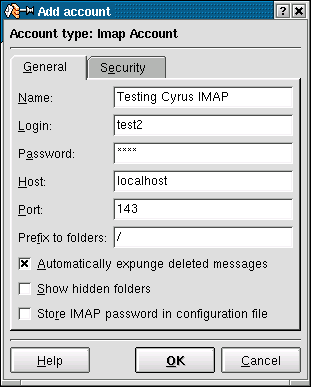
Figure 3. Creating a new account

If you enabled TLS/SSL, you may wish to test also the following: .:: forums.sorcererking.com ::.

Figure 4. Testing TLS/SSL functionality

If login fails, and you are sure, you typed the right password, take care that MySQL is running.

Share or Research:

Share on FB Post to X LinkedIn 🤖 Ask AI about this