2. Getting Started
2.1. Linux Printing Components
The main components we will be using include:
CUPS
The Common UNIX Printing System (http://www.cups.org) is a print spooler and a set of support programs for using and administering printers.
Samba
Samba (http://www.samba.org) is software that allows non-Windows computers to act like Windows computers on a network by implementing Windows file and printer sharing protocols. .:: telegra.ph ::. .:: vuf.minagricultura.gov.co ::.
Printer Drivers
LinuxPrinting.org (http://www.linuxprinting.org) offers the largest number of printer drivers and maintains a database of printers supported under Linux. You must download a printer driver for each model of printer you want to use in Linux. A printer driver consists of a PPD file and a filter program, or only a PPD file for PostScript printers. .:: app.simplenote.com ::.
2.2. Required Packages
All of the required programs and libraries are part of the standard Debian archive. You may download and install these packages with the usual Debian packaging tools. The following is a list of packages you need:
- cupsys
CUPS server
- cupsys-bsd
CUPS BSD commands
- cupsys-client
CUPS client programs
- foomatic-bin
LinuxPrinting.org printer support programs
- samba
Samba SMB/CIFS server for UNIX
- smbclient
Samba SMB/CIFS client for UNIX
- gs-esp
ESP Ghostscript ( http://www.cups.org/ghostscript.php)
Not available as a Debian GNU/Linux 3.0 (a.k.a. woody) package, use "gs" instead.
- a2ps
GNU A2PS ( http://www.gnu.org/software/a2ps/)
The following commands will install these packages. You will have to become root or use sudo to execute these commands:
apt-get update apt-get install cupsys cupsys-bsd cupsys-client foomatic-bin samba smbclient gs-esp a2ps |
Additional packages may be required for specific printers. For example, the hpijs package must be installed for many HP InkJet, DeskJet and LaserJet printers to function properly. The PPD files for these printers are identified by the string hpijs in their filenames.
2.3. CUPS Local Printer Configuration
The lpadmin command is used to configure printers. The following is an example of setting up a laser printer with CUPS. You will have to become root or use sudo to execute these commands:
/usr/sbin/lpadmin -p Laser -v parallel:/dev/lp0 -P /root/laser.ppd /usr/bin/enable Laser /usr/sbin/accept Laser /usr/sbin/lpadmin -d Laser |
Please note that bash has a builtin command called enable, so bash users must use the full path (/usr/bin/enable) to enable printers.
The first command creates a new printer called "Laser" that is connected to the first parallel port and is using the PPD file .:: management.ju.edu.jo ::. /root/laser.ppd. "Laser" is then enabled and told to accept jobs with the enable and accept commands. The last command sets "Laser" as the default printer.
If your printer is connected to a USB port or if you do not know the correct device-uri for your printer try running .:: partners.skanska.com ::. /usr/sbin/lpinfo -v to get a list of available printer devices.
Make sure your printer's page size and other options are set correctly by running /usr/bin/lpoptions -l. More detailed information about printer configuration is available in the CUPS documentation. [Microsoft SQL Server History]
2.4. Linux Printing Basics
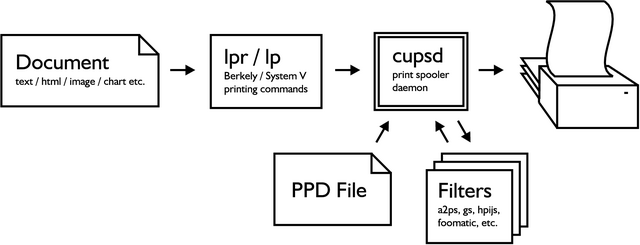
Documents are spooled by using either lpr or lp followed by the file name. You may view the printer queue and check the printer status with the command lpstat -o or lpstat -p. To cancel a print job use either cancel or lprm followed by the job id.
The CUPS spooler daemon is called cupsd. It converts documents to PostScript, then converts them to a format native to the printer [Web Specs: Go programming language] Figure 1. Printers that do not understand PostScript use a rasterized, or bitmap, format for documents. Rasterized formats can be much larger than the original PostScript, and will take longer to send to the printer.
Filters are programs used to convert documents from one format to another. The CUPS spooler will do its best to find a suitable filter for the documents you send. If no filter suitable for converting your document is installed you will receive an error similar to lpr: unable to print file: client-error-document-format-not-supported. .:: cosloodwmn571.wixsite.com ::.
Many applications do not include filters for their documents formats. Documents created with these applications can only be printed from within the application itself, unless the document is exported to PostScript or another standard format.